[Case 04]
Improved Communication Efficiency with Seamless Chat, Call & Group Interactions
Communication / SaaS
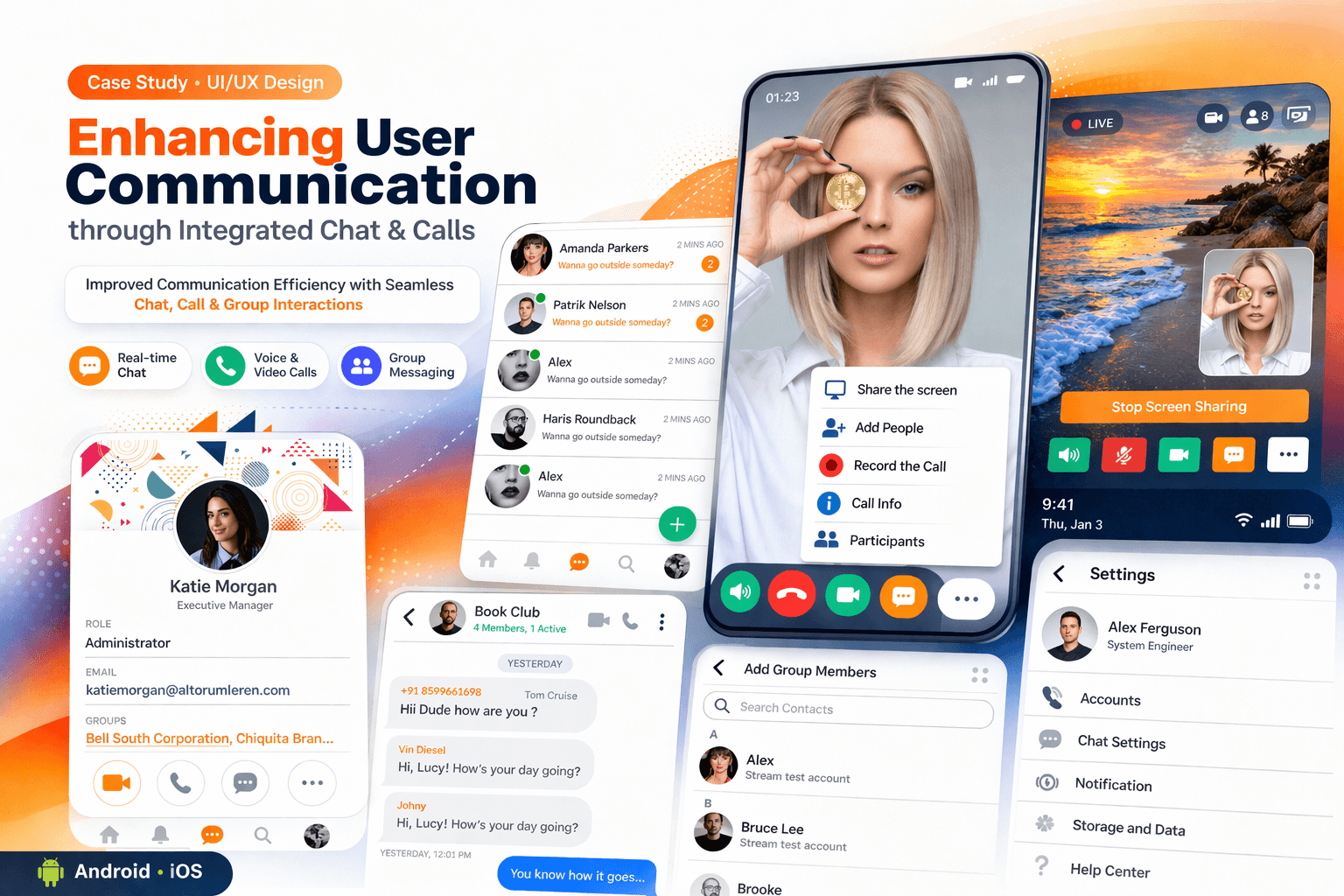
Designing a Unified Communication Platform for Chat, Calls & Collaboration
Simplifying Real-Time Communication Through Intuitive Messaging and Calling Flows
[Project Overview]
Led the design of an end-to-end communication platform combining chat, voice/video calls, and contact management into a cohesive experience. Identified usability gaps in navigation, feature switching, and interaction clarity that were slowing down user communication.
Redesigned key workflows to create a seamless transition between messaging and calling, improved usability through intuitive UI patterns, and optimized real-time interactions. The result was a more efficient, scalable, and user-friendly communication experience.
[Problem Statement]
The existing communication experience was fragmented across chat, calls, and contacts, making it difficult for users to switch between features efficiently and slowing down real-time interactions.
[Industry]
Communication / SaaS
[My Role]
UI UX Designer
[Platforms]
Android and IOS
[Timeline]
September 2020- January 2021
[Persona]

Jhon Roberts
Business/Operations Professional
I frequently communicate across chats, calls, and groups for work and personal use. I need a seamless experience where I can quickly connect, switch contexts, and manage conversations without friction.
Age: 32
Location: Bengaluru
Tech Proficiency: High
Gender: Male
[Goal]
Communicate quickly across chat and calls without switching between multiple apps
Manage conversations efficiently across individual and group chats
Experience seamless real-time communication with minimal delays or interruptions
[Frustrations]
Difficulty switching between chat, calls, and contacts smoothly
Unclear notifications or missed messages/calls due to poor system feedback
Cluttered interface making it hard to manage multiple conversations
[Process]
[01] User Research
Conducted interviews with active users to understand how they communicate across chat, calls, and groups, and identify pain points in switching between these features.
Analyzed user behavior and interaction patterns to identify friction points in navigation, message handling, and call initiation.
Studied competitor platforms to evaluate best practices in real-time communication, feature integration, and user experience.
[02] Insights
Users found it difficult to switch seamlessly between chat, calls, and contacts due to fragmented navigation.
Managing multiple conversations (individual and group chats) was overwhelming due to lack of clear structure and organization.
Users needed better feedback and visibility for actions like message delivery, call status, and notifications.
[03 Design Solution]
Redesigned navigation to create a seamless transition between messaging, calling, and contact management
Improved conversation hierarchy and organization for better management of individual and group chats.
Enhanced system feedback with clear indicators for message status, call activity, and notifications.
[04] Testing & Iteration
Conducted usability testing with users to evaluate how effectively they could navigate between chat, calls, and contacts in the redesigned experience.
Collected user feedback on messaging, calling flows, and overall navigation, and iterated on the design to reduce friction and improve clarity.
Refined mobile experience by improving touch interactions, simplifying navigation, and optimizing layouts for faster communication.
[Outcome]
Reduced time to initiate chat and calls through simplified navigation
Improved efficiency in managing conversations across chats and groups
Enhanced user satisfaction with clearer workflows and better real-time feedback
[Key Learnings]